
Your site launched. Then the requests started.
A campaign needs three landing pages by Friday. The CMS has a field nobody can edit. An integration broke. A page loads in four seconds on mobile. None of it is a project, so none of it gets a project budget. It lands on whoever has time, which usually means it waits.
What Do Webflow Development Services Actually Cover?
Webflow development services cover both building a site and keeping it working: design and Figma handoff, CMS architecture, third party integrations, custom code, migrations, speed and SEO work. Agencies sell them in two shapes. A build is quoted as a project, with a defined scope and an end date. Everything after launch is quoted as ongoing work, usually a monthly arrangement.
This post is about the second shape, because it is the one nobody prices in public and the one most teams get wrong.
The line between the two is usually drawn at structure. Changing what a page says is ongoing work. Deciding what pages exist is a project.
Ongoing scope is typically new landing pages, CMS structure changes, third party integrations, speed and Core Web Vitals work, accessibility fixes, schema markup and bug fixes. None of it has a defined end, which is why it is bought by the month instead of quoted task by task.
What Does Ongoing Webflow Work Cost?
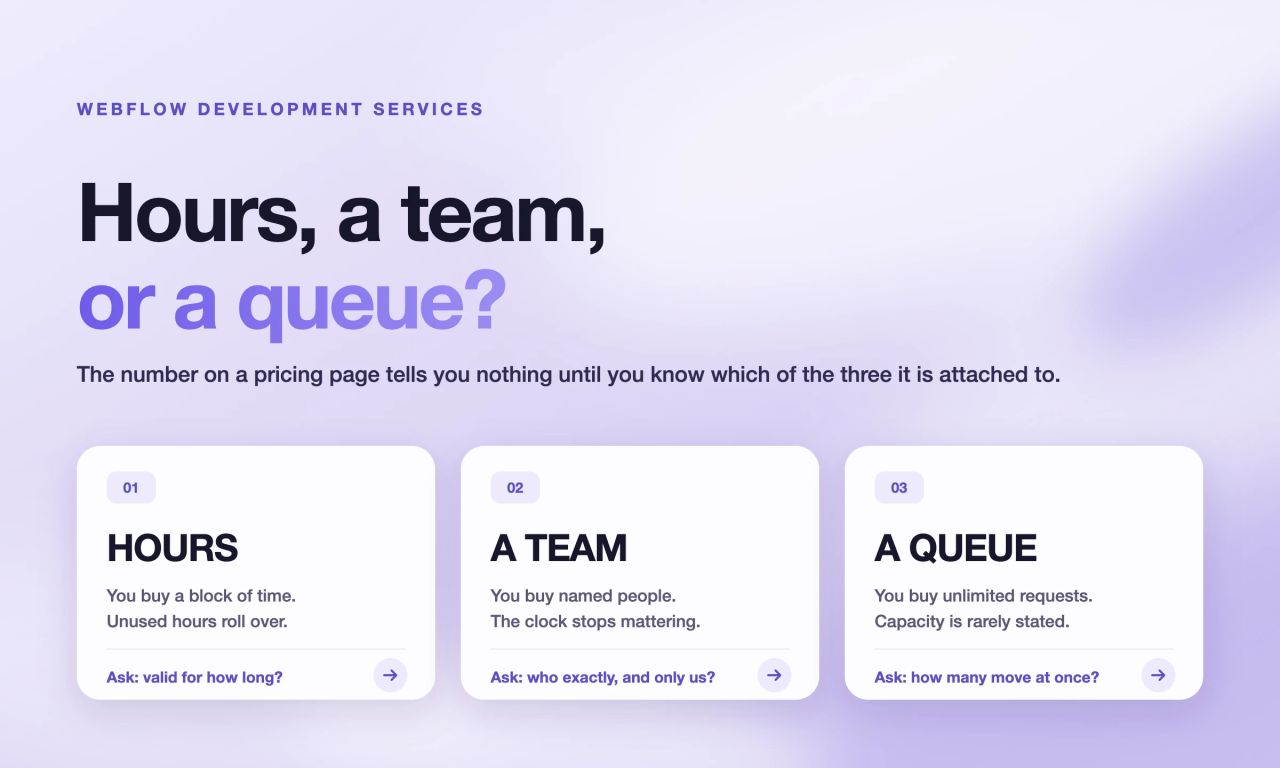
Ongoing Webflow work is sold in three shapes, and a monthly figure means very little until you know which shape you are looking at. Providers sell blocks of hours, a named team for a fixed monthly fee, or a queue with no stated capacity. Two plans at the same price can be completely different products, and two plans far apart can both be reasonable.
The gap between the cheapest and the most expensive plan on this market is more than fourteen times. That is not a discount ladder. It is the difference between buying ten hours a month and contracting a team for a year. Neither is expensive or cheap on its own. They are answers to different questions, and the only mistake is buying one while you have the other problem.
So the useful question is not what a provider charges. It is what the number buys: how many hours, whether they expire, how many of your requests move at once, and what happens when none of them is the thing you actually need this month.
Hours or a Fixed Fee: Which Shape Fits Your Work?
The shape of the arrangement separates these offers more than the price does, and almost no pricing page explains which shape it is selling. A price can be attached to hours, to people, or to nothing in particular, and only the first two can be checked. Ask which one you are buying before you compare any two numbers, because otherwise you are comparing a clock against a payroll.
A retainer is a monthly block of hours. You pick the size, the rate falls as the block grows, and unused hours carry forward. Our blocks run from 20 hours at $120 an hour down to 120 hours at $70, and anything unused stays valid for 12 months.
A fixed fee plan is the opposite shape: it ignores hours entirely and gives you a named project manager and developer for the same number every month. Ours starts at $4,900.
A queue is the third shape: you buy the right to submit unlimited requests, and the provider works through them in priority order. What you are not told is how many move at once, which is the number that decides how fast anything actually ships. Creative Corner Studio works in the first two shapes only. Hours and a named team can both be checked against what you actually used; a queue cannot, and we would rather you could.
Maintenance, fixes and campaign pages tend to fit the block. A site being actively rebuilt tends to fit the fixed fee, because nobody wants to watch a clock while a roadmap is running.
What Does This Look Like Over a Year?
For example, Gymdesk came to us as a project rather than a retainer: 491 blog posts and a full site moved to Webflow, signed on 9 September 2025 and live on 11 December 2025, thirteen weeks from contract to launch. The interesting part is what happened after the launch, not during the build.
What happened next is the part worth reading. Before launch, they asked for retainer options unprompted. Since December 2025 the partnership has run on prepaid hour packages with a weekly call, and it is still running twelve months later.
In that time the site has grown to 1,226 URLs live in two languages, English and Japanese, verified in August 2026. Event landing pages have shipped in under 24 hours against live deadlines, alongside comparison pages, a hero refresh and pricing redesigns.
A 24 hour turnaround is not something you can scope, quote and contract for each time it is needed. That is the whole argument for a monthly arrangement, stated as one client rather than as a principle.
How Fast Should Webflow Maintenance Be?
Ask for a number against a real example rather than a service level promise. The useful question is how long one campaign landing page takes from brief to live, and separately, what happens when the site is down at nine on a Monday. Those are two different commitments and most providers publish neither.
Our commitments are under 48 hours as standard, under 24 hours from 40 hours a month, and two to three hours if the site is down. Among the other Webflow agencies, the clearest commitment we found was 72 hours on an hour pack. Most publish nothing at all.
Support is the vaguer word. Ask whether it means someone answers within a day or someone fixes within a day. Those are different services.
What Does Webflow Performance Optimization Involve?
Webflow handles hosting, SSL and security patches. Everything that affects how fast your pages actually load is yours: images, scripts, fonts, third party marketing tags and the structure of the page itself. Performance optimization is the ongoing work of keeping those under control, because every one of them grows without anyone deciding that it should.
In practice performance work means auditing what loads before the page becomes usable, then removing, deferring or resizing it. Core Web Vitals give you the measurement, and they move when images are properly sized, when marketing tags stop blocking rendering, and when fonts load without shifting the layout.
This is the clearest case for ongoing work rather than a project. Performance degrades every time someone adds a tag or uploads an unoptimised image, which is to say continuously.
What Changes for High-Traffic Business Websites?
The work does not change. The cost of a mistake does. On a site with low traffic a broken form is noticed on Monday. On a site that carries your pipeline it is counted in lost leads by lunchtime, which is why response time matters more than feature lists at this end of the market.
A two to three hour commitment for a site that is down is worth more than an extra tier of included services.
The second change is review. Higher traffic means changes get tested rather than shipped on instinct, which needs capacity reserved for measurement, not only for building.
What Does Maintenance Look Like on a Complex Site?
Complexity is easier to show than to define. Klipboard runs 1,556 URLs across 8 markets in 4 languages on a single Webflow project, carrying 6,082 hreflang annotations. Every new page on a site like that has to be created, translated and cross-linked in eight places, or the hreflang set breaks silently.
That is the difference between maintenance on a brochure site and maintenance at this scale. The work is not harder per task. There are simply more places for one task to go wrong, and most of them produce no visible error.
Structure is the part that has to survive. On the RAM Tracking migration, 100% of the URL structure was kept across three locales, and a crawl of more than 700 pages five weeks after launch found zero internal 404s. That number is the test of whether a complex site was maintained properly, not the launch itself.
A plan that covers content edits does not cover this. On our plans, JavaScript and API work starts from 40 hours a month, because at this scale that work is continuous rather than occasional.
Is a Maintenance Retainer Worth It for Continuous Improvement?
A maintenance retainer is worth it when the work is iterative, and not when it is occasional. Conversion work is iterative by nature: a test, a result, a change, another test. Quoting each round as a project adds a scoping conversation to every iteration and kills the pace that makes testing worth doing.
The caveat is capability. A development plan ships what you design. If you want someone running the experiments and reading the results, that is a growth engagement rather than a build one.
The honest case against: if your site genuinely changes twice a year, you are paying for availability you will not use.
Are Webflow Development Services Better Than a Freelancer?
The choice between an agency and a freelancer depends on volume and risk, not on hourly rate. A freelancer is cheaper per hour and fine for occasional, self contained tasks. A monthly arrangement costs more but removes the overhead of briefing, scheduling and quality checking, and it does not disappear mid campaign.
The practical threshold is continuity. Below roughly ten hours of work a month, a freelancer is usually the right answer. That figure is our estimate rather than a measured benchmark, so test it against your own last quarter.
| Freelancer | Monthly arrangement | In house hire | |
|---|---|---|---|
| Cost shape | Per hour or per task | Fixed monthly or a block of hours | Salary plus overhead |
| Good for | Occasional, defined tasks | Continuous, undefined work | Permanent high volume |
| Cover when away | None | Team covers | Nobody |
| Ramp up | Days | Days | Weeks to months |
| Risk | Single point of failure | Contractual | Hiring risk |
The pressure behind this question is budget, not preference. Marketing budgets have been effectively flat for three years, at 7.7% of company revenue in 2025 and 7.8% in 2026 (Gartner, 2026 CMO Spend Survey), across roughly 400 CMOs each year in North America, the UK and Europe. In the 2025 round, 59% said they had insufficient budget to execute their strategy (Gartner, 2025 CMO Spend Survey).
That is the real argument for a fixed monthly number. Not that it is cheaper, but that it is defensible in a budget review and it removes the scoping negotiation that happens every time work is quoted separately.
How Do You Choose a Reliable Webflow Maintenance Agency?
Start by counting, not comparing. List everything you asked for in the last three months and could not get done. That list is your real monthly volume, and it answers the size question before you look at a single price.
Then check four things. Who is assigned, and whether it is a named developer or a shared pool. What unlimited means in practice, including how many requests run at once. Turnaround for urgent work, stated as a number. Notice period, and what happens to your Webflow project if you leave.
The last one matters most and is asked least. Ask who owns the Webflow workspace and whether you keep it.
One filter cuts the list quickly. Check the provider in the official Webflow partner directory and look at their tier. Premium and Enterprise partner status is granted by Webflow, not self declared.
Who Can Manage Ongoing Webflow Updates and Fixes?
Three kinds of provider sell this. Productized subscription brands sell design and development on a monthly plan across several platforms, with Webflow as one option. Webflow specialist studios sell ongoing work alongside project work, usually with deeper platform expertise. Freelance collectives offer lower prices with less structure.
The difference that matters is not the label. It is whether anyone is accountable for your site between requests. A queue with no named owner will process tasks and never notice that your Core Web Vitals have been failing since March.
How to Know If You Need One
Three signs, in order of how clearly they point at a monthly arrangement. Each one is about waiting, not about money.
- Requests wait. Work is listed, agreed and still not live after a month. A pricing page change approved in January that still has not shipped in March.
- Quotes cost more than the work. You spend longer scoping a two hour task than doing it would take.
- The site is business critical and nobody owns it. Nobody is accountable for speed, uptime or structure between projects.
If none of these are true, you do not need one yet. If two or more are, compare what Webflow maintenance covers against what you are currently paying per quote.
If you would rather just ask, get in touch and send us the last three months of requests you could not get done. We will tell you which shape covers them, or tell you that you do not need one.