


A Webflow migration costs $5,000 to $25,000 for most B2B websites, $30,000 to $150,000+ for enterprise sites, and as little as $3,000 for small business sites under 3 pages. These ranges come from Webflow's published pricing, Upwork's 2025 Webflow developer hourly rate data, and Creative Corner Studio's migration work across B2B clients including Gymdesk, Energo-Pro, and Juma. The wide range exists because four factors drive price more than anything else: page count, design complexity, CMS volume, and integrations.
This guide breaks down what a Webflow migration actually costs at each tier, what's included, what most quotes leave out, and how the costs compare to keeping your current platform.
Quick Answer: Webflow Migration Cost by Site Size
Most teams shopping a Webflow migration want a number first and details second. Here are the realistic ranges across the four common site sizes.
These ranges hold for WordPress, Wix, Squarespace, HubSpot, and custom CMS migrations to Webflow. Source platform affects the work less than people expect. Site size, integration complexity, and content volume drive the price.
For a complete walkthrough of our migration service, see our WordPress to Webflow Migration service.
Why does a Webflow migration cost what it does?
Four variables explain almost every quote you'll see. Understanding them tells you whether a quote is fair, padded, or unrealistically low.
1. Page count (the biggest factor)
Each page needs to be designed, built, populated with content, and QA'd. A 10-page site at $200 per page is $2,000. A 200-page site at $200 per page is $40,000. Per-page pricing isn't fixed but scales roughly linearly with complexity until you hit enterprise CMS volumes.
2. Design complexity
Migrating a content-heavy site with a simple template into Webflow is fast. Migrating a heavily-designed marketing site with custom interactions, scroll animations, complex grids, and bespoke layouts takes 3-5x longer per page. Agency quotes that ignore this question are guessing.
3. CMS collection volume and structure
Sites with one blog and 50 posts are easy to migrate. Sites with 8 CMS collections (blog, case studies, team, services, locations, news, integrations, jobs) and thousands of items take significant work to design, structure, and import. Webflow has hard limits per plan (Starter: 50 items, Basic: no CMS, Premium: 20,000 items, Enterprise: customizable), and complex CMS architecture decisions made early have downstream cost implications.
4. Integrations and custom code
A migration that re-implements 6 third-party integrations (HubSpot, Calendly, Intercom, Mixpanel, custom API forms, etc.) easily adds $5,000 to $30,000 to the base price. Based on Creative Corner Studio's integration work, basic form-to-CRM connections typically take 20 to 50 hours per integration. Bi-directional API sync, custom webhook flows, and signup-and-login flows that touch your application backend run 80 to 250+ hours. At $100 to $200 per hour for qualified Webflow development (Upwork, 2025), that's $2,000 to $5,000 for simple integrations and $10,000 to $50,000+ for complex bi-directional sync.
What does a Webflow migration cost at each site size?
Small Business: $5,000 to $30,000 (under 50 pages)
For sites under 50 pages with a standard blog and basic forms, typical price bands based on Creative Corner Studio's small-business migration work and the $20 to $200 per hour range from Upwork freelancers up through US-based Webflow specialists:
- 3 to 10 pages, no CMS: $5,000
- 10 to 22 pages with blog: $15,000
- 30 to 50 pages with custom integrations: $20,000 to $30,000
Agency pricing at this tier typically runs $5,000 to $15,000. The premium pays for project management, design refinement, schema implementation, redirect mapping, and a proper post-launch QA. Freelancer pricing covers the build but usually skips most of those steps. Worth it if you have the in-house SEO and PM capacity to fill those gaps yourself.
Mid-Market B2B: $15,000 to $50,000 (50 to 200 pages)
This is where most B2B SaaS, healthcare, and consulting migrations land. Pricing scales with CMS complexity and integration count.
- 50 to 100 pages, single CMS, light integrations: $15,000 to $25,000
- 100 to 200 pages, multiple CMS collections, HubSpot or similar CRM integration: $25,000 to $50,000
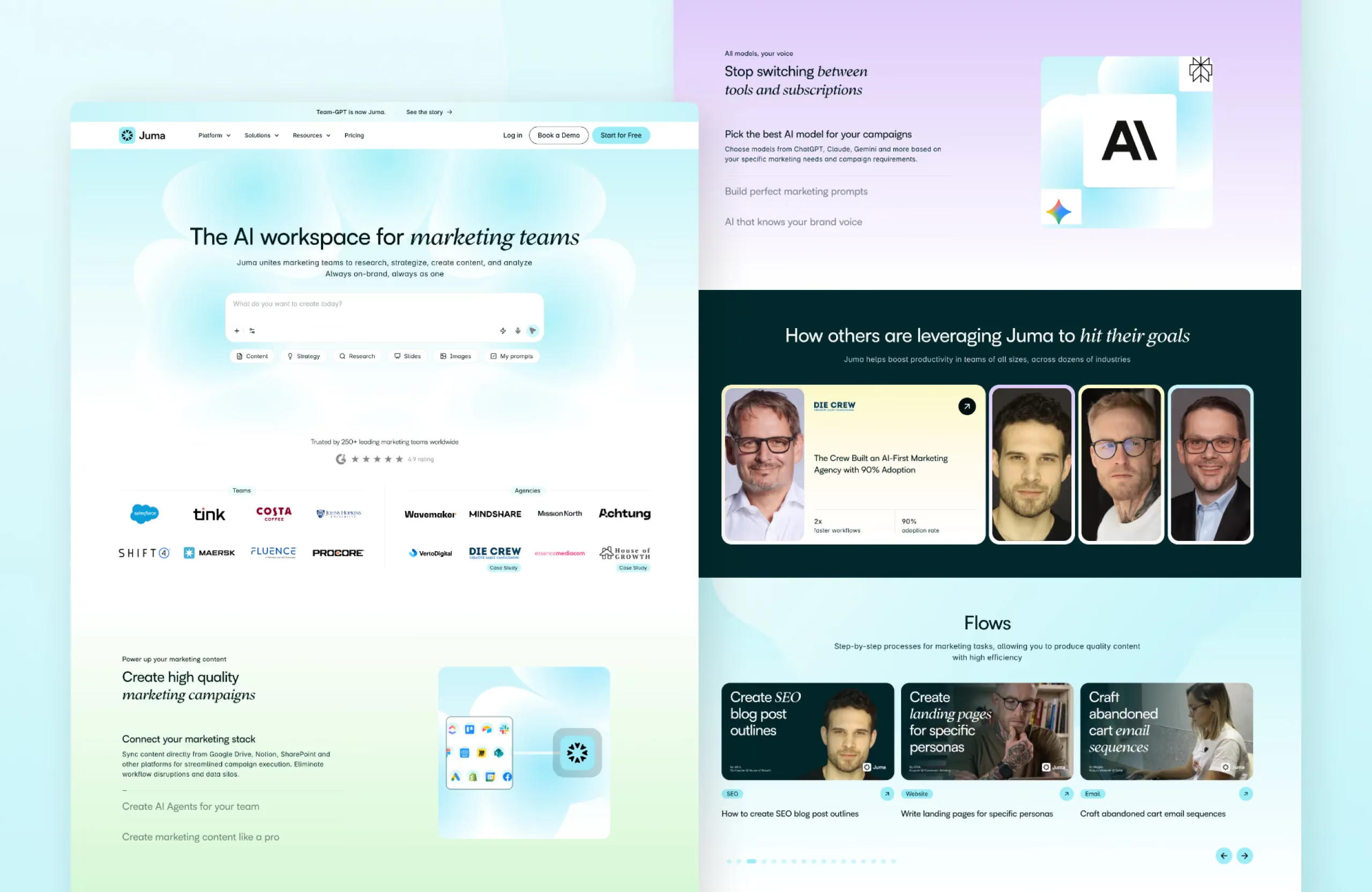
Creative Corner Studio WordPress to Webflow migration starts at $8,000 and most mid-market projects land in the $15,000 to $35,000 range, depending on the four factors above. We migrated Gymdesk from WordPress to Webflow with zero SEO loss and 38% organic growth within 3 months at this tier. Juma's 216-page migration ran for 40 business days with custom API forms, GA4/Clarity/GTM migration, and a full rebrand from TeamGPT.
Large: $30,000 to $100,000 (200 to 500 pages, complex CMS)
Larger sites need staging environments, role-based CMS permissions, more rigorous QA, and longer post-launch monitoring. Common at this tier:
- 4 to 8 active CMS collections
- HubSpot, Salesforce, or custom CRM integration
- Multi-team publishing workflows
- Bilingual or multi-language considerations
- Schema rebuild across all page types
Energo-Pro's migration sits at the top of this tier: 3 websites consolidated into 1 bilingual enterprise site with 1,670 unique pages, 1,262 news articles migrated with zero SEO loss, HubSpot CRM integration with logic-based lead routing, and role-based CMS permissions for 10+ internal users.
Enterprise: $80,000 to $500,000+ (multi-site, multi-language, custom)
Enterprise migrations split into three rough bands based on scope and complexity, drawn from Creative Corner Studio's enterprise migration work (including Energo-Pro's 1,670-page bilingual consolidation) and Webflow's published Enterprise pricing structure:
- Marketing microsites: $40,000 to $80,000
- Mid-market B2B builds: $80,000 to $200,000
- Complex enterprise migrations with custom integrations: $200,000 to $500,000
On top of the build, Webflow Enterprise licensing runs $15,000 to $100,000+ annually depending on workspace count, content limits, and support requirements (Webflow, Plans & pricing, 2026). This is a separate line item from migration fees.
See the Energo-Pro 1,670-page enterprise migration case study for an example of an enterprise-tier project.

Should you hire an agency, a freelancer, or migrate yourself?
The choice between freelancer, agency, and DIY shifts the math significantly. Each has a defensible use case.
Freelancer: $20 to $45 per hour
The Upwork median Webflow developer rate is $31 per hour, with most rates falling between $20 and $45 per hour (Upwork, Webflow Developer Hourly Rates, 2025). Senior US-based freelance specialists charge $100 to $200+ per hour.
Best for: Sites under 30 pages, simple design, no critical SEO equity to preserve, business owner with project management capacity.
Risk: Most freelancer engagements don't include redirect mapping, schema migration, post-launch SEO validation, or 30-day support. Read prior posts on what migrations cost when these steps get skipped: 17% of site migrations never recover their pre-migration traffic (Search Engine Journal, 2025).
Agency: $100 to $250+ per hour
Agency rates split into three tiers based on Creative Corner Studio's 2026 benchmark of EU and US Webflow agency pricing:
- Boutique certified agencies: $100 to $150/hr. Small teams, often specialized in one industry vertical.
- Premium certified agencies: $150 to $200/hr. Mid-size, broader service offering including design and SEO.
- Webflow Enterprise Partners: $175 to $250+/hr. Highest certification tier, multi-site capability, formal SLA, dedicated PM.
Best for: Sites where SEO equity, design quality, schema migration, or integration complexity creates real business risk if mishandled.
DIY: $0 in fees, 40 to 200 hours of your time
DIY is viable for technical founders with time. Realistic time investments:
- Under 10 pages, no CMS: 30 to 60 hours
- 10 to 50 pages with blog: 60 to 120 hours
- 50+ pages with custom CMS: 120 to 200+ hours
Webflow University's free WordPress to Webflow tutorial series (Webflow University, WordPress to Webflow Introduction) covers the basics. The technical work is doable. The judgment calls (which URLs to redirect, which schema to migrate, how to handle pagination) are where DIY most often fails.
What does Webflow cost after the migration is done?
The build cost is one-time. Webflow's hosting and CMS plans are recurring. Webflow simplified its plans for 2026: the old CMS and Business tiers were consolidated into Premium, which now includes the full CMS at the same $25/month price. Current site plans:
- Starter: Free. 50 CMS items, 1 GB bandwidth, webflow.io subdomain. Useful for testing, not production.
- Basic: $15/month (billed annually). 300 static pages, custom domain, no CMS.
- Premium: $25/month (billed annually). Full CMS with 20,000 items, 2.5 TB bandwidth, form file upload, site search.
- Team: $2,500/month (annual contract). Multi-site, Webflow Localization, publishing workflows, advanced governance.
- Enterprise: Custom pricing. Granular permissions, custom roles, dedicated account manager, enhanced SLAs.
Source: Webflow, Plans & pricing, 2026.
For a typical B2B mid-market site, you'll spend $180 to $300 per year on the site plan, plus any retainer for ongoing development.
What hidden costs do most Webflow quotes miss?
The base migration quote is the visible price. Five common cost categories often appear separately or get billed as overruns.
Integration rebuilds: $2,000 to $30,000+
Each third-party integration (HubSpot, Salesforce, Mixpanel, Calendly, Drift, etc.) needs to be reconnected to the new Webflow site. Based on Creative Corner Studio's integration work, simple form-to-CRM connections run 20 to 50 hours per integration ($2,000 to $5,000 at qualified Webflow developer rates). Bi-directional API sync, custom webhook flows, and signup-and-login flows that touch your application backend run 80 to 250+ hours ($10,000 to $50,000+).
Creative Corner Studio implemented custom API forms via webhooks for Gymdesk to connect signup and login flows directly into Gymdesk's application. That work alone is a separate line item on a Gymdesk-sized migration.
Custom code re-implementation: variable
Sites with hand-coded interactions, custom scripts, A/B testing tags, or proprietary widgets need re-implementation in Webflow. Scope varies wildly. Budget $2,000 to $20,000 for non-trivial custom code work.
Training: $2,000 to $5,000
Your marketing team needs to learn Webflow's CMS and Designer. A proper training engagement is 2 to 4 sessions covering CMS publishing, component reuse, image handling, and SEO settings. Without training, marketing teams default back to "ask a developer," which defeats the productivity reason for migrating.
Post-launch optimization: $10,000 to $30,000
The first 60 to 90 days post-launch typically surface issues: missed redirects, schema gaps, performance regressions, mobile parity bugs. Enterprise agencies bake this into the contract. Boutique agencies usually charge separately.
Schema and SEO migration work
If a migration quote doesn't itemize schema migration (Organization, BlogPosting, FAQPage, BreadcrumbList, Service, Person) and the SEO checklist work (redirect mapping, sitemap submission, GSC verification), assume those are out of scope and budget accordingly. CCS treats SEO migration as part of the base price for any WordPress to Webflow project.
What Webflow Saves You After Migration?
The migration cost looks expensive in isolation. The 3-year total cost of ownership tells a different story.
WordPress maintenance pricing (your current cost)
Codeable's 2026 WordPress maintenance pricing breakdown (Codeable, WordPress Maintenance Pricing for 2026):
- Basic maintenance plan: $140/month (~$1,680/year)
- Advanced maintenance plan: $590/month (~$7,080/year)
- Enterprise maintenance plan: $1,000+/month (~$12,000+/year)
Freelance WordPress developer rates: $50 to $150/hr. Agency rates: $100 to $250/hr. The maintenance line covers plugin updates, security patches, backups, uptime monitoring, and reactive fixes.
What you stop paying for after migration
WordPress maintenance pays for plugin updates, security patches, backups, uptime monitoring, and reactive fixes. None of that work exists on Webflow. The platform handles updates, security, and hosting automatically. That removes the $1,680 to $12,000+ per year WordPress maintenance line entirely (Codeable, 2026). Webflow's Premium plan ($25/month) replaces it.
You also stop paying for: premium plugin licenses (Yoast Premium, ACF Pro, Gravity Forms, security and backup plugins typically run $400 to $800/year combined), managed WordPress hosting ($30 to $50/month at Kinsta or WP Engine for a business-grade site), and developer hours every time a plugin update breaks the site.
3-year TCO comparison (apples-to-apples)
The fair comparison includes every recurring cost on both sides, not just the visible ones. For a mid-market B2B site running on WordPress with an advanced maintenance plan vs Webflow on the Business plan, here are two scenarios.
Scenario A: Hosting and maintenance only (no growth work)
On raw ongoing cost, Webflow is roughly $23,000 cheaper over three years because the WordPress maintenance line disappears entirely.
Scenario B: Hosting, maintenance, and an active growth retainer
With a growth retainer on top of both sides, Webflow is still ~$23,000 cheaper because the maintenance line is already covered by the platform.
The retainer is the work that drives growth: new pages, conversion optimization, design work, SEO improvements. WordPress maintenance is reactive (fix what breaks). A Webflow retainer is proactive (grow what works). When you remove the maintenance overhead, that proactive budget goes further on the same monthly spend.
How long does a Webflow migration take?
Cost and timeline correlate but aren't the same conversation. Realistic timelines based on Creative Corner Studio's migration work across small business through enterprise B2B clients:
Compressing the timeline below these ranges usually means cutting corners on SEO migration, schema, or post-launch QA. The result tends to show up as ranking loss 30 to 60 days after launch.
Conclusion
Webflow migration costs $5,000 to $25,000 for most B2B sites, $30,000 to $150,000+ for enterprise, and as low as $3,000 for small business work. The wide range exists because page count, design complexity, CMS volume, and integrations drive price more than the source platform does. Done right, the migration pays back in 30-40% annual maintenance savings and the marketing team autonomy that makes the platform worth picking in the first place.
Gymdesk migrated from WordPress to Webflow with zero SEO loss and 38% organic growth within 3 months. The migration cost was a fraction of the pipeline that growth produced. The math works when the execution is right.
If you want a defensible quote for your specific site (not a guess), we'll walk through the four pricing factors against your page count, integrations, and CMS structure, and give you a fixed-price estimate within a week.
Sources
All retrieved 2026-05-19.
- Webflow, Plans & pricing, 2026. https://webflow.com/pricing
- Webflow University, WordPress to Webflow Introduction. https://university.webflow.com/videos/wordpress-to-webflow---introduction
- Upwork, Webflow Developer Hourly Rates, 2025. https://www.upwork.com/hire/webflow-freelancers/cost/
- Codeable, WordPress Maintenance Pricing for 2026, 2026. https://www.codeable.io/blog/wordpress-maintenance-pricing/
- Search Engine Journal, How Long Should An SEO Migration Take? Study Updated, 2025. https://www.searchenginejournal.com/study-how-long-should-seo-migration-take/492050/
- Creative Corner Studio, EU/US Webflow agency pricing benchmark, internal research, 2026.
- Creative Corner Studio, WordPress to Webflow migration work across B2B clients (Gymdesk, Energo-Pro, Juma), 2024-2026.


