Webflow vs Divi: Expert-Proven Comparison & Insights
Published January 21, 2026Reading time: 10 min
The difference is architecture. Divi is a theme and plugin you bolt onto WordPress, so you own the stack and you maintain it. Webflow is a SaaS platform that combines the visual designer, the CMS and hosting in one place. This comparison covers design control, performance, SEO, pricing, security, scaling and who each one actually suits.
Quick Take: Webflow vs Divi:
→ Design Control: Webflow offers pixel-perfect design and advanced interactions; Divi is faster for template-based layouts but limited by modules.
→ Performance: Webflow has built-in hosting, CDN, and clean code for faster load times; Divi depends on hosting, caching, and plugin optimization.
→ SEO & AEO: Webflow’s semantic code and structured data support technical SEO and AI-driven answer engines; Divi requires plugins like Yoast or Rank Math for advanced SEO.
→ Maintenance & Security: Webflow handles hosting, updates, and enterprise-grade security automatically; Divi requires manual plugin and server management.
→ Scalability: Webflow handles traffic spikes easily but has CMS item limits; Divi scales infinitely for content but needs advanced server setups.
→ E-commerce: Webflow E-commerce is clean and brand-focused; Divi + WooCommerce supports complex operations and large SKUs.
→ Best Fit: Use Webflow for established or ambitious brands prioritizing speed, design fidelity, and low-maintenance operations. Use Divi for cost-conscious projects leveraging WordPress’s plugin ecosystem and large content libraries.
Picking the right platform for your website can feel like choosing the right car for a road trip. Do you go for the reliable sedan that gets the job done with zero fuss, or the high-performance 4x4 that gives you full control but requires skill to handle?
At Creative Corner, we’ve spent over a decade building and fixing websites, migrating clients from one platform to another, and seeing firsthand what works, and what fails spectacularly.
In the red corner, there’s Divi, the WordPress favorite for quick, drag-and-drop sites. In the blue corner, Webflow, our go-to platform, offering pixel-perfect design, clean code, and performance that actually scales.
In this guide, we break down Webflow vs Divi on design, ease of use, SEO, performance, and cost - so marketing directors and brand managers like you can make the call with confidence.
What is the Core Difference Between Webflow and Divi?
To understand the difference, you have to look at the architecture.
What is Divi?
→ Divi is a plugin and theme that lives on top of WordPress. Think of WordPress as the engine and chassis of a car. It is reliable, open-source, and you own it.
Divi is a custom body kit and a set of power tools you bolt onto that chassis to make it look and drive the way you want. You are responsible for the engine maintenance (hosting), the oil changes (updates), and security (plugins).
What is Webflow?
→ Webflow is a SaaS (Software as a Service) platform. It’s the car, the mechanic, and the garage all in one.
It combines a visual design interface with a Content Management System (CMS) and built-in hosting, making Webflow development straightforward for brands that want to design, launch, and manage sites without worrying about servers or updates.
You don't install software, you log in and build. Webflow generates clean HTML, CSS, and JavaScript based on your visual inputs.
The Business Impact:
Divi/WordPress: Offers maximum flexibility and ownership but requires ongoing maintenance (DevOps). If a plugin breaks, you fix it.
Webflow: Offers a simplified, "no-maintenance" environment. You pay a subscription for the platform to handle the heavy lifting of hosting and security, allowing you to focus on design and content.
Webflow vs Divi: Feature Comparison At a Glance
Feature
Webflow
Divi
Architecture
All-in-one SaaS Platform
WordPress Theme & Plugin
Code Quality
Semantic, clean HTML/CSS
Heavy, relies on shortcodes
Hosting
Managed AWS (Included)
Self-Hosted (You choose provider)
Maintenance
Zero (Auto-updates)
High (Manual updates required)
Design Control
100% pixel perfection
High, but constrained by theme
Learning Curve
Steep (Professional tool)
Moderate (Beginner friendly)
Security
Enterprise-grade, built-in
User managed (Plugins/Hosting)
Which Platform Offers Better Design Control?
For digital-first brands, design isn't just about aesthetics; it is about conversion and brand authority.
→Webflow is widely considered the superior tool for pure design fidelity. It gives you a visual interface for writing CSS.
When you drag a "div block" onto the canvas and add padding, you are literally writing clean code in the background. This allows for:
Pixel-Perfect Precision: You control the exact positioning, typography, and spacing of every element.
Complex Interactions: Webflow's interaction engine allows for scroll-based animations, parallax effects, and complex reveal triggers without writing a single line of JavaScript.
Class-Based Styling: You build a design system. You create a class called .primary-button, style it once, and apply it everywhere. Change it once, it updates everywhere.
→Divi is built for rapid assembly using modules. You drag in a "Blurb" module or a "Slider" module and use toggle switches to customize it.
Strengths: It is incredible for getting a decent layout up fast. The library of 2,000+ pre-made layouts is a massive time-saver for agencies churning out brochure sites.
Weaknesses: You are limited by the module's settings. If you want a specific hover effect that isn't in the toggle list, you have to write custom CSS. Divi uses "shortcodes" to render content, which means the underlying code is messy compared to Webflow's clean output.
Expert Take:
Use Webflow for bespoke, high-end design. Divi for quick, template-based builds.
How Does Performance Compare Between Webflow and Divi?
In 2026, speed is money. Google’s Core Web Vitals are a key ranking factor.
Performance and Hosting: Webflow vs Divi (WordPress with Divi)
→ Webflow
Hosting is included as part of the service plan.
Sites are delivered via a global CDN and AWS infrastructure, ensuring consistent performance worldwide.
Webflow handles hosting, SSL, security, backups, and infrastructure maintenance automatically.
The code Webflow generates (HTML, CSS, JS) tends to be cleaner and lighter than heavily plugin-powered WordPress sites.
→ Divi (on WordPress)
Divi does not include hosting. You must choose and manage a separate hosting provider.
Site speed and performance depend heavily on hosting, server configuration, caching, and asset optimization (images, CSS/JS, etc.).
Divi relies on themes, plugins, and dynamic rendering (shortcodes, CSS/JS), which can add “bloat” and slow the site if not optimized.
To get good performance, Divi sites require careful hosting selection, caching, image optimization, and plugin management.
Expert Take:
Webflow offers built-in hosting, CDN, infrastructure management, and optimized code, making high performance easier to achieve out of the box.
Divi sites can also perform well, but speed and reliability depend on hosting choice, optimization practices, and plugin/theme management.
Which Platform is Better for SEO?
For digital-first companies, organic visibility is non-negotiable.
→ Webflow offers a distinct technical SEO advantage.
For brands looking to improve organic visibility, Webflow SEO provides a clean, structured foundation that simplifies meta management, schema implementation, and indexing.
Native Tools: You have full control over meta titles, descriptions, Open Graph settings, and indexing rules directly in the designer.
Clean Code: Search engine spiders love clean, semantic HTML. Webflow serves this by default, making it easier for Google to crawl and understand your content.
Schema: You can add custom attributes to elements, effectively building structured data without plugins.
AEO (Answer Engine Optimization): Because the structure is so logical, AI models (like the one powering Google Overviews) find it easier to parse Webflow sites for answers.
→ Divi relies on the WordPress ecosystem.
Plugins Required: Out of the box, WordPress is okay, but for serious SEO, you need plugins like Yoast SEO or Rank Math. These are powerful tools that often offer more guidance than Webflow (like readability analysis).
The Risk: Heavy themes like Divi can hurt your Core Web Vitals (speed), which is a ranking factor. You can have perfect keywords, but if your site takes 4 seconds to load, Google will penalize you.
Want to know more about Webflow SEO capabilities? Check out our ultimate ‘Is Webflow Good for SEO?’ guide.
Expert Take:
Webflow for technical foundation. Divi (with plugins) for on-page content guidance.
How Do the Pricing Models Compare?
This is the most common point of confusion. You have to compare apples to apples - specifically, the Total Cost of Ownership (TCO).
Webflow vs Divi - Pricing & What’s Included
→ Webflow
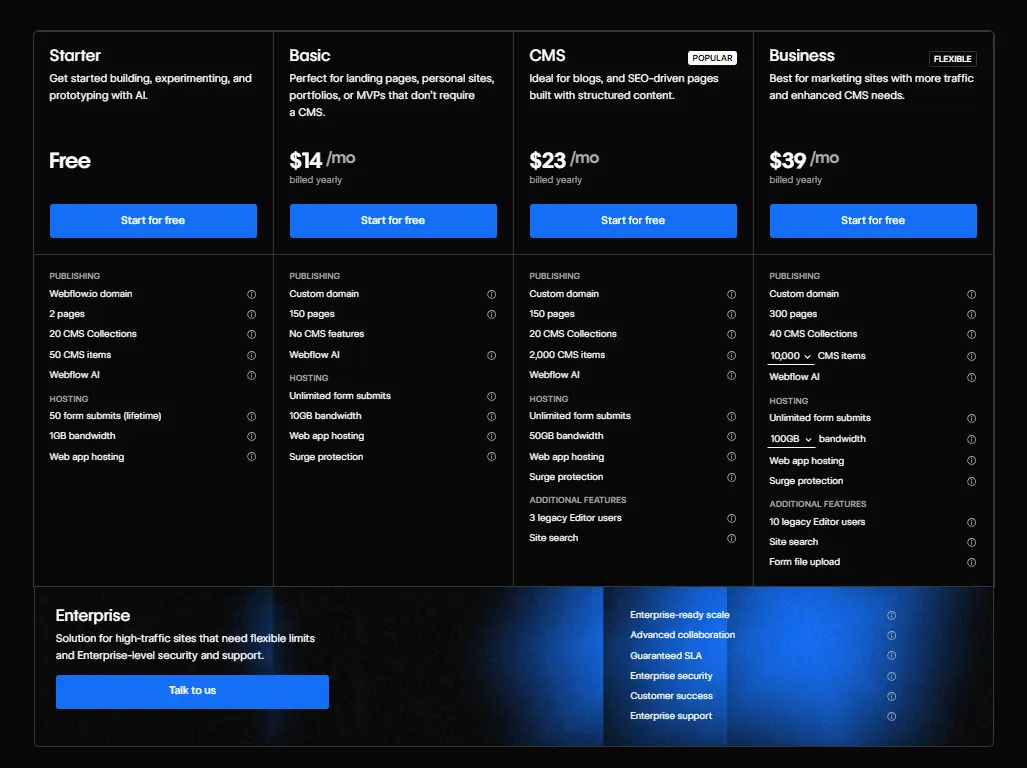
Webflow uses subscription-based site plans. As of late 2025, typical site-plan prices run roughly $14–$39/month per site – for standard hosting + CMS.
This subscription includes hosting, CDN, SSL, backups, and server maintenance – you don’t pay separately for those.
Because hosting and infrastructure are built in, your main recurring cost is the Webflow site plan.
→ Divi (on WordPress)
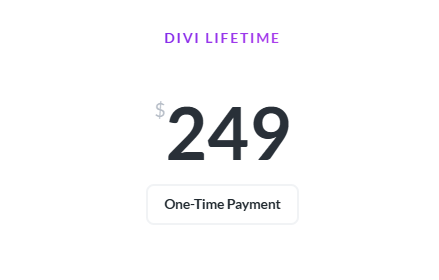
Divi is offered via a license. Standard pricing is $89 per year for the annual plan – or $249 one-time for lifetime access.
Divi does not include hosting or server maintenance – you must obtain separate hosting and pay hosting costs.
Hosting costs vary – depending on provider and plan, typical hosting may range from $5–$50/month per site, though quality managed hosting tends to be higher.
On top of hosting, WordPress + Divi often requires managing updates, security, backups – and possibly paying for premium plugins or services.
What It Means for Total Cost of Ownership
With Webflow – your recurring cost is essentially the monthly site plan ($14–$39/month) – hosting, security, CDN, SSL and infrastructure are handled.
With Divi – you pay the license fee ($89/year or $249 once) – plus separate hosting and maintenance costs. Depending on your hosting choice and site needs, monthly costs vary.
If you want minimal maintenance and a hands-off setup – Webflow offers a simpler cost structure.
If you want full control over hosting and are comfortable managing server and site maintenance – Divi gives flexibility, but requires more responsibility.
Your Brand Deserves a Pixel-Perfect Webflow Website →
Creative Corner handles design, development, SEO and migration so your team can focus on growth.
Security is a top concern for brands. A hacked website can destroy trust, impact conversions, and harm SEO performance.
WordPress + Divi
WordPress is a frequent target for hackers. This is not because the software is inherently insecure, but because it is the most widely used CMS and relies on site owners to manage updates.
Vulnerability: Every plugin or theme you install introduces potential risks. Outdated WordPress core, Divi, or plugins can be exploited.
Responsibility: Security is primarily on you. You must maintain firewalls, malware scanners, regular backups, and update schedules to reduce risk.
Webflow
Webflow is a closed, managed platform. Users cannot install server-side plugins, reducing potential vulnerabilities.
Managed Security: Webflow handles infrastructure, SSL, backups, and server security. Updates and patches are applied automatically.
Compliance: Webflow meets enterprise-level security standards, including SOC 2.
SSL: Included and enforced by default.
With Webflow, brands can focus on marketing and growth while the platform maintains security and uptime.
Expert Take:
Webflow provides lower-maintenance, enterprise-grade security, while WordPress + Divi requires active management and technical oversight to remain secure.
Which Platform Scales Better for Business Growth?
Scalability means your site doesn't break when your traffic spikes or your content library grows.
→Webflow scales effortlessly on traffic. Because it is built on AWS and uses a serverless structure, it can handle massive traffic spikes without crashing.
However, Webflow has hard limits on CMS items (currently around 10,000 items on standard plans). If you are building a massive programmatic SEO site with 50,000 pages, you will hit a ceiling.
→Divi (WordPress) scales infinitely on content. You can have 100,000 blog posts if you want. However, scaling traffic requires serious server resources.
You will need to upgrade from shared hosting to dedicated servers or cloud clusters as you grow, which requires technical expertise to manage.
→ Divi integrates with WooCommerce, the most popular e-commerce platform in the world.
Pros: Infinite payment gateways, plugins for subscriptions, booking, complex shipping rules, and complete control.
Cons: It is heavy. WooCommerce can slow down a Divi site significantly if not optimized. It also requires constant maintenance.
→ Webflow E-commerce is native.
Pros: You design the checkout flow visually. It is beautiful, custom, and integrated.
Cons: It is not as feature-rich as WooCommerce. It lacks deep support for complex tax rules in some countries, POS integrations, and high-risk payment processors.
Who Should Use Webflow and Who Should Use Divi?
Breaking this down by business priorities and goals.
Choose Webflow If:
You are an Established or Ambitious Brand: You need complete design control, clean code, and a polished web presence that reflects your brand authority.
Low Maintenance Priority: Hosting, security, and updates are handled by the platform, reducing reliance on manual plugin management.
Performance-Focused: You run campaigns or need fast-loading pages to maintain high user engagement, SEO rankings, and conversion rates.
Scalability Matters: You anticipate traffic spikes or growing content needs and want a platform that handles them without complex infrastructure management.
Choose Divi If:
Budget-Conscious: You prefer lower upfront costs and the ability to use the same license across multiple smaller projects.
WordPress Ecosystem Required: Your business relies on specific plugins or integrations only available in WordPress.
Content Volume Management: You prioritize handling large content libraries without CMS item limits.
Can You Migrate from Divi to Webflow (or Vice Versa)?
This is a critical question for businesses feeling stuck. Migration between these two platforms is not a simple "export/import" click.
Because their underlying architectures are so different - one is a database-driven CMS theme, the other is a flat-file generator - moving content is manual labor.
If you are moving from Divi to Webflow, you are essentially rebuilding. You can export your WordPress blog posts to a CSV and import them into the Webflow CMS (which works beautifully), but the pages themselves?
You have to redesign them. This sounds daunting, but it is often the best time to do a brand refresh. You strip away the bloat of the old site and rebuild only what you need, resulting in a leaner, faster product.
Moving from Webflow to Divi/WordPress is also possible. You can export the HTML/CSS code from Webflow, but putting that into WordPress requires converting it into a PHP theme - a task for a developer.
Alternatively, you would just rebuild the design using Divi's visual builder.
Expert Take:
Don't migrate just to migrate. Switch platforms only when your current tool is actively preventing you from hitting a business goal - whether that's SEO rankings, load speed, or design capability.
What About Third-Party Integrations?
No website exists in a vacuum. It needs to talk to your CRM, your email marketing tool, and your analytics.
→ Divi (WordPress) wins on sheer quantity of native integrations. If a software exists, there is a WordPress plugin for it. Want to connect to HubSpot? There's a plugin. Want to add a complex booking calendar? There are ten plugins.
The downside is that adding these plugins adds weight to the site.
→ Webflow handles integrations differently. It relies on tools like Zapier, Make (formerly Integromat), and native apps to connect to CRMs, email marketing platforms, analytics, and other software.
For example, you can integrate HubSpot using Webflow’s native forms or webhooks, sending data directly to your CRM without installing heavy plugins that load scripts on every page.
This approach keeps the core site lightweight, improves performance, and maintains a modern, scalable architecture.
Get Proven Webflow Strategies for Better Marketing Results Based on 350+ Projects We’ve Delivered
When your site goes down at 2 AM, who do you call?
With Divi, support is provided by Elegant Themes.
They have a chat system and good documentation. However, if your site breaks, they will often say, "It looks like a conflict with your hosting or another plugin."
You then have to go talk to your host (like Bluehost or SiteGround), who might blame the theme. You can get stuck in a support loop.
With Webflow, support is centralized. While they don't offer phone support (which frustrates some enterprise clients), their email support is highly technical and helpful.
More importantly, because they control the hosting and the software, they can't pass the buck.
If the server is down, it's on them. They also have an incredibly active community forum where you can often get answers from experts faster than official channels.
Webflow vs Divi: Pros and Cons Summary
Webflow
Pros
Design Freedom: Complete control over CSS/HTML visually.
Clean Code: Excellent for SEO and performance.
Zero Maintenance: No plugins to update or security patches to install.
Reliability: Enterprise-grade hosting on AWS included.
Client Editor: A restricted editor mode that lets clients change text/images without breaking the layout.
Cons
Learning Curve: Requires understanding of web design fundamentals.
Price: Higher recurring monthly cost per site.
CMS Limits: strict limits on the number of database items.
E-commerce: Less robust than WooCommerce for complex needs.
Divi
Pros
Ease of Use: True drag-and-drop with a massive template library.
Ecosystem: Access to 60,000+ WordPress plugins.
Pricing: One-time fee for unlimited sites is incredible value.
Flexibility: Can build literally anything if you find the right plugin.
Ownership: You own the code and the server.
Cons
Bloat: Can generate messy code that hurts load times.
Maintenance: "Plugin fatigue" - constant updates and compatibility checks required.
Security: High risk if not actively managed.
Design Constraints: Harder to break out of the "grid" without custom coding.
Expert Take:
The choice comes down to how you view your website.
→ If your site is a strategic asset that must be high-performance, secure, and fully aligned with your brand, Webflow delivers long-term value in trust, SEO, and efficiency.
→ If your site is a cost-conscious project that leverages existing tools and plugins, Divi on WordPress offers flexibility and scalability at lower upfront investment.
How Creative Corner Can Help
Choosing the right platform is just the first step. At Creative Corner, we help established brands design, build, optimize, and migrate websites to Webflow with pixel-perfect precision, high performance, and enterprise-grade security.
From strategy and UX design to development and launch, we ensure your digital presence reflects your brand authority while minimizing maintenance headaches.
Stop Struggling with Plugins and Updates →
Move to a clean, reliable Webflow site with zero maintenance stress.
There is no universal "better," only better for your goals. If you prioritize clean code, high performance, and total design freedom without maintenance headaches, Webflow is the superior professional tool. It is the choice for modern, digital-first brands. However, if your priority is cost-efficiency, unlimited site usage, and access to the massive WordPress plugin ecosystem, Divi offers better value and flexibility.
Why do People Choose Webflow Over Divi?
People choose Webflow to escape "Plugin Hell." In the Divi/WordPress ecosystem, you often need five different plugins just to get a site to run fast and rank well. Webflow users choose the platform because they want an all-in-one solution where hosting, security, and speed are handled for them. They also choose it for the "Designer" interface, which allows for bespoke, award-winning animations and interactions that are incredibly difficult to replicate in Divi.
Is Webflow Easier to Use than Divi Builder?
No. For a complete novice, Divi is easier. You can install a pre-made layout and just change the text in minutes. Webflow requires you to learn the basics of HTML and CSS (like how flexbox works). However, once you learn Webflow, many professionals find it faster to use because the class-based system allows for rapid, site-wide global changes, whereas Divi often requires manual updates to individual elements.
Is Webflow Better for Design than Divi?
Yes. Webflow creates a direct bridge between visual design and production code. It allows for pixel-perfect precision and complex, timeline-based animations that Divi's module-based system simply cannot match natively. With Webflow, you are building the web; with Divi, you are assembling a page.
Can Webflow or Divi Handle Enterprise-Level Websites?
Both platforms can support enterprise websites, but in different ways. Webflow’s all-in-one SaaS architecture, global CDN, and built-in security make it ideal for high-traffic, design-focused enterprise sites with minimal maintenance. Divi on WordPress can also scale to enterprise needs, but it requires careful hosting, plugin management, and ongoing technical oversight to maintain performance, security, and stability.