Every marketing team asks the same question before a redesign: will we lose our rankings? The fear is justified. Most post-redesign traffic drops trace back to three preventable causes: deleted URLs without redirects, content rewritten without checking what ranked, and launches nobody crawled before DNS day.
We've run this play repeatedly: across six recent redesign and migration projects (Testlio, RAM Tracking, Klipboard, Energo-Pro, Gymdesk, and Juma) we moved more than 2,900 pages onto new designs, new platforms, or consolidated domains. Measured result: zero SEO loss on every launch, and in one case 38% organic growth within three months. This guide is that process, with the real numbers.
Key Takeaways
- Redesigns don't lose rankings. Unmapped URLs, rewritten ranking content, and unaudited launches do.
- Decide every page's fate from Analytics and Search Console data before design starts, and crawl the staging site like Google will.
- Across 6 projects and 2,900+ migrated pages, our preserve/merge/retire audit produced zero SEO loss.
- Gymdesk grew organic traffic 38% in 3 months post-migration.
Why Do Website Redesigns Lose Rankings?
Rankings live at URL level, not site level. When a redesign changes or removes URLs without 301 redirects, the equity attached to those URLs (backlinks, ranking history, internal links) evaporates. Google's own site-move documentation says even a well-executed move takes weeks for a medium site to reprocess.
The second killer is invisible: content changes. A page ranks because of specific passages, headings, and internal links. Redesigns that "freshen the copy" on ranking pages routinely delete the exact paragraphs Google was rewarding. Did anyone check what the page ranked for before rewriting it? Usually not.
The third is launch-day chaos: broken canonicals, staging noindex tags left on, sitemaps pointing at old URLs. None of this is exotic. All of it is preventable with a checklist and a crawler. If you're budgeting the work, see what a Webflow migration costs.
What Should You Audit Before Touching the Design?
Audit first, design second. Before we designed a single screen for Energo-Pro's three-sites-into-one consolidation, we crawled all three domains, pulled Google Analytics to find every page with real organic traffic, and pulled Search Console to see which URLs held backlinks and keyword positions. Then every page got one of three labels: preserve, merge, or retire.
That categorization is the whole game. Energo-Pro's three sites carried 1,262 pages of accumulated content built up over years. A typical redesign would have cut whole sections for "simplicity" and lost the long-tail equity. The data said preserve. We migrated all 1,262 pages across two languages, and the consolidation launched with zero SEO loss on a site of roughly 1,670 total pages.
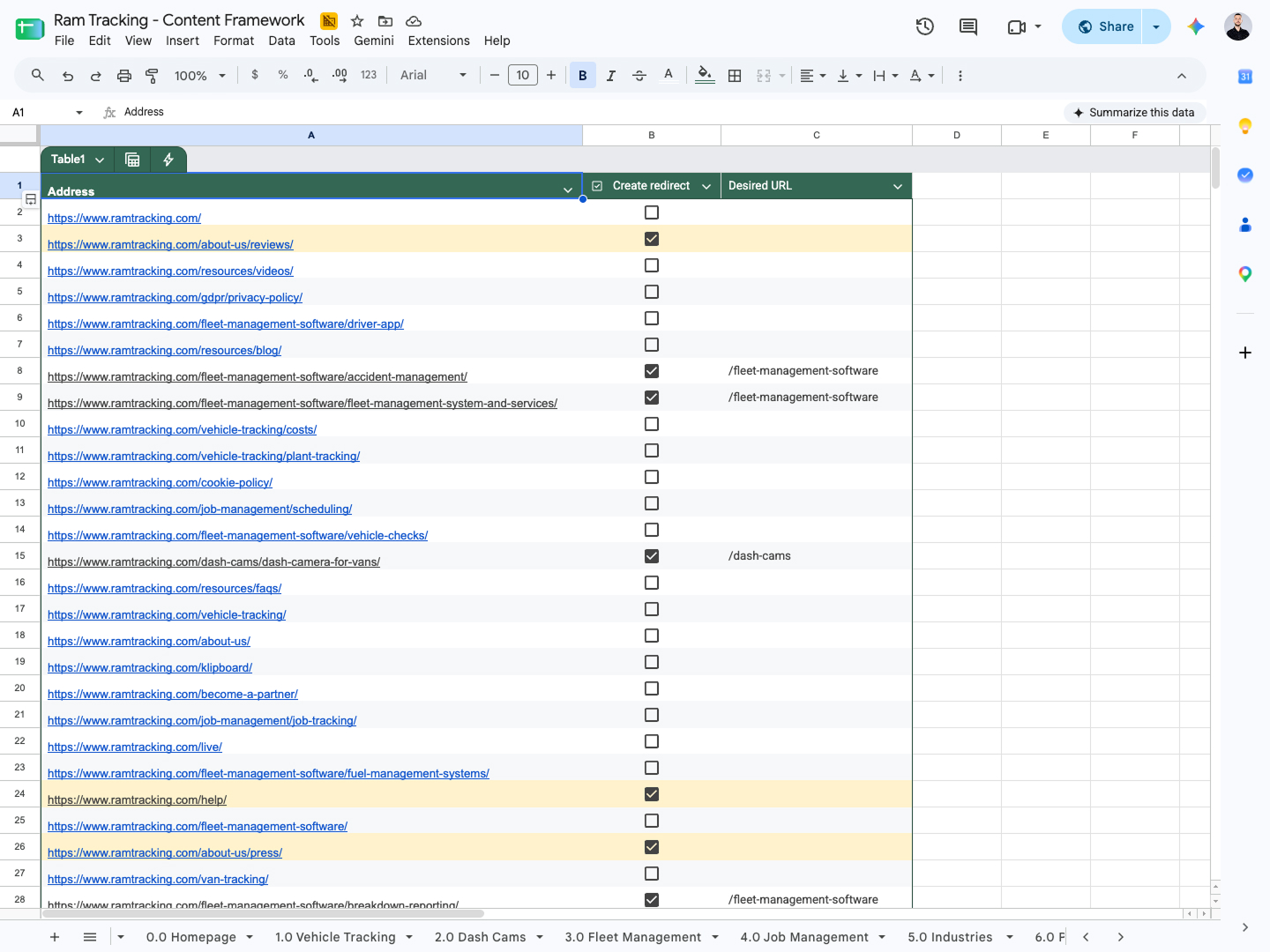
The audit deliverable is a spreadsheet, not a slide deck: every URL, its traffic, its backlinks, its ranking keywords, its fate, and its redirect target if it's merging or retiring. On RAM Tracking, that content framework spreadsheet defined every page in the new structure before design began. Their team always knew what to write. We always knew what to build.
Practical rule: any page with organic entrances, external backlinks, or a top-20 keyword position gets preserved or explicitly merged. Pages with none of the three can retire, with a redirect to the closest surviving parent. This audit is the core of our SEO and AEO service.
How Do You Protect URLs and Redirects During a Redesign?
Keep the URL structure wherever you can. Where you can't, map every old URL to its closest new equivalent before launch. On RAM Tracking we preserved the existing URL structure outright and imported the full redirect map into Webflow ahead of the DNS cutover. Five weeks after launch, an independent crawl of 700+ pages found zero internal 404s.
Redirect mapping gets harder when the old site is bigger than the new one. Testlio's WordPress site had grown to hundreds of unique pages; the rebuild deliberately consolidated them. Hundreds of unlinked legacy pages were deleted at launch, and each one got a 301 to preserve its equity. Deleting a page is fine. Deleting it silently is not.
A redirect map also has to survive renames that happen mid-project. Klipboard's migration included legacy product renames and even Unicode URL variants, and rebrands have a habit of changing naming conventions after the map is "done." Treat the redirect map as a living document with an owner, not a one-time export. A stale entry produces a 404 for real visitors.
Consolidation Is the Redesign's Secret SEO Weapon
Here's the counterintuitive part: the best redesigns delete most of the site's templates. Testlio's WordPress site had hundreds of pages because every page was custom. We collapsed the architecture into roughly 13 reusable templates, which now power 823 live pages, and migrated about 200,000 monthly visits onto them without losing SEO equity.
Consolidation helps SEO three ways. Fewer templates means consistent heading structure, schema, and internal linking on every page, so fixes apply site-wide instead of page by page. It means the marketing team ships new pages in hours without a developer, so content stays fresh. And it forces the preserve/merge/retire conversation that most redesigns skip.
Template-driven rebuilds also cut QA time dramatically: RAM Tracking's industry pages were built directly in Webflow from a template, moving faster than a full design pass while keeping every SEO element consistent. Planning a move off WordPress? Start with our WordPress to Webflow migration service.
How Do You QA a Redesign Before Launch?
Crawl the staging site like Google will, fix everything, then crawl it again. On Klipboard, the client's senior search specialist ran three full staging audits, and we treated them as a joint QA sprint: between the first and second crawls, nine days apart, client-side errors dropped from 566 to 269 and server errors went from five to zero. By launch, every finding was cleared.
The pre-launch checklist that has caught the most issues for us:
- Full crawl (Screaming Frog or similar) for 404s, redirect chains, duplicate titles, and orphaned pages
- Canonical and hreflang verification on every template, especially multi-locale builds
- Schema validation on raw HTML, not in a visual preview. Broken JSON-LD is invisible in a CMS designer and only shows up when you parse the source
- Meta and heading diff against the old site for every preserved ranking page
- Staging noindex removal confirmed as a launch-day step with a named owner
The hreflang line item deserves extra paranoia on multi-locale builds. In a 2023 Ahrefs study of 374,756 domains using hreflang, 67% had at least one implementation issue, and 16.9% pointed hreflang tags at redirected or broken pages (Ahrefs, hreflang study, 2023). That's exactly the class of error a staging crawl catches before Google does. RAM Tracking ran three locales and its post-launch crawl verified hreflang correct on every page.
On RAM Tracking we proposed additional hours of manual pre- and post-launch SEO checks beyond the contracted scope. The client approved in five minutes. That's the correct level of paranoia for a site that ranks.
What Actually Happens on Launch Day?
A good launch is boring. RAM Tracking's DNS cutover ran live over email with their IT team: the site was verified, published, and secure 80 minutes after the DNS change. The redirect map was already imported. The sitemap was ready to submit. Nothing was improvised.
The first post-launch week matters as much as the day itself. Submit the new sitemap in Search Console immediately and watch the coverage report daily. On RAM we fixed the GSC sitemap submission and resolved a duplicate-content issue within days of launch, then ran a performance pass that caught a review widget loading three times on every page. Small leaks, caught early, stay small. Our Webflow development team builds this monitoring into every launch.
How Long Until You Know the Redesign Worked?
Expect reprocessing, not results, in the first weeks. Google's documentation is explicit that medium-sized site moves take a few weeks for most pages, and larger sites take longer. Judge the migration at 30, 60, and 90 days, not at 7. Semrush's website migration checklist, updated in May 2026, gives the same advice: set calendar reminders and review performance at 30, 60, and 90 days post-launch (Semrush, 2026).
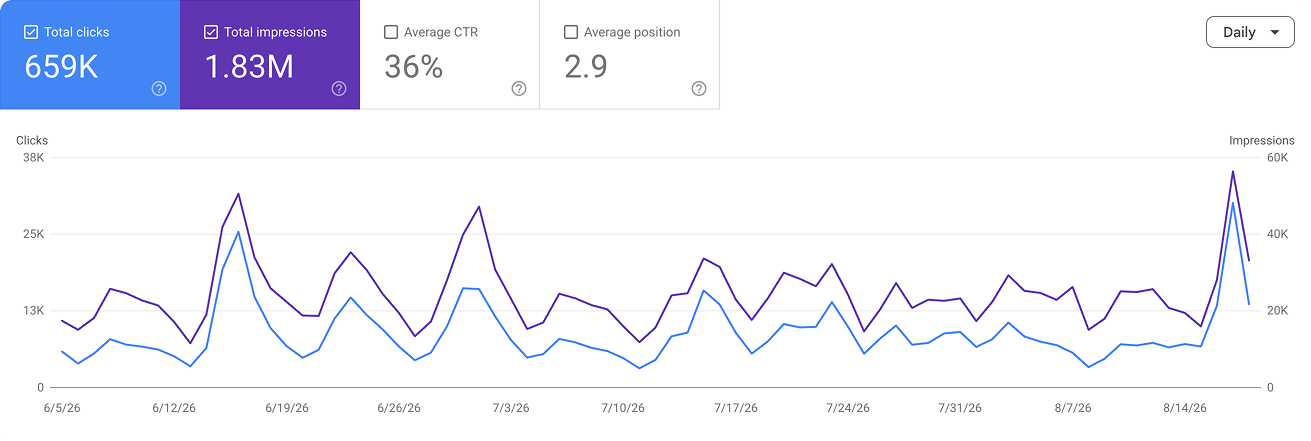
What the checkpoints looked like on our projects: RAM Tracking's independent 700+ page crawl at five weeks showed zero internal 404s, with hreflang, canonicals, and structured data verified correct. Gymdesk, a WordPress-to-Webflow migration, held every ranking and then grew organic traffic 38% within three months. Juma moved 216 pages in 40 days with zero loss. The pattern is consistent: when the audit and redirect work is done before design, the post-launch chart is flat, then up.
The Numbers Across Six Redesign and Migration Projects
ProjectMigration typeScaleSEO outcomeTestlioWordPress to Webflow823 pages, ~13 templates, ~200K monthly visitsEquity preserved through consolidationRAM TrackingRebrand + rebuild, 3 locales664 URLs, 122 blog postsZero internal 404s in a 700+ page crawlKlipboardHubSpot to Webflow, 8 locales~200 pages566 to 269 errors cleared pre-launch, zero server errorsEnergo-Pro3 sites merged into 1, bilingual1,670 total pages, 1,262 migrated across two languagesZero SEO lossGymdeskWordPress to WebflowFull siteZero loss, then +38% organic in 3 monthsJumaWordPress to Webflow216 pages in 40 daysZero SEO loss
Source: Creative Corner Studio project records, 2025-2026. Crawl results independently verified per project.